How Much Does It Cost To Build A Gaming PC? Everything You Need to Know
Both gaming pc and console have had a great decade. Now the first half of 2021 is over, and the gaming industry has taken a step forward.
But, gamers often argue about which is better between console gamers and PCs. However, the PCs win more votes.
It is not easy to understand the performance and price of a gaming computer. A common question is: How much will it cost to build a gaming computer in 2021?
Quick and Short Answer: A gaming computer can cost between $200 and $2000. A detailed guide will answer this question.
Hardware is now more affordable and accessible to a broader audience.
Each company strives to be the best. As a result, it provides buyers with many options.
Sometimes, the market can be a little too saturated, so it’s fun to build a computer without spending a dime.
This guide will help you understand the type of computer that is best suited for your needs.
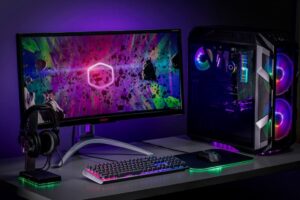
Custom Rigs or Pre-Built
Hardware champions will tell you that finding the parts and putting them together is part of the joy of PC gaming.
We know that not everyone has the time, and it’s hard to believe that everyone knows how to build a gaming computer. Many manufacturers sell prebuilt computers.
Which one should you choose? The answer is simple.
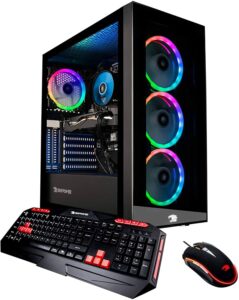
Prebuilt Gaming Computer
Pre-built are an excellent option if you don’t have the time or are afraid of putting together your computer on your own.
You will need to look for an acceptable deal.
You also get warranty and customer support, so you don’t have to do it all yourself.

Custom Gaming Computer
However, it is possible to save a lot of money by assembling your apparatus yourself.
We recommend that you build a small gaming computer by yourself if your budget is tight.
You should remember that you will need to either troubleshoot the problem yourself or contact the manufacturer if there is a problem with a particular part.
The Components
We will focus on both high-end enthusiast builds, and budget gaming builds.
However, newcomers may appreciate a refresher course on the components and what you should spend on them.
This section of the guide will help you decide which features are worth spending money on and which ones you can save.

The Processor For Gaming PC
You can interact with all your programs and apps using the CPU.
While we don’t believe that it is necessary to explain the process, you probably know.
A quad-core processor is sufficient if you are primarily interested in playing games.
Six-core processors can be more expensive, but they are still affordable.
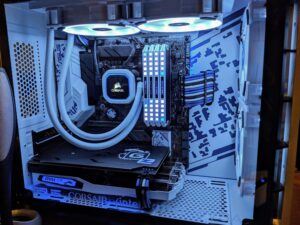
CPU Cooler
A CPU cooler includes a heatsink that is placed over the CPU to cool it.
There are three types of CPU Coolers on the market: AIO CPU Coolers (Air CPU Coolers or Liquid CPU coolers).
Note: This guide will help you select the best CPU cooler for your budget.

RAM (Random Access Memory).
RAM (or memory) has been thankfully much more affordable in the past year.
A 16GB storage kit will be available for as low as $50-$70 in 2021.
Most people should have 16 gigs, as the game is getting more difficult.

Motherboard For Gaming PC
You don’t have to buy all the fancy features like RGB, Bluetooth, or WiFi.
However, a motherboard that has a high VRM is essential if you intend to use a high-end processor or overclock.
The VRM reduces power from the power supply to a voltage that is usable by your Processor.
You need to ensure that the VRM quality is high if you want to push your Processor to its maximum potential

Storage (Hard drives and SSDs).
We don’t want anyone new to the world to experience the frustrations of a mechanical hard drive.
We recommend a 120GB SSD even if you don’t have the budget for a larger capacity SSD. In addition, this SSD will allow you to boot up Windows and other programs.
Note: This guide will help you select the best gaming SSD for 2021.
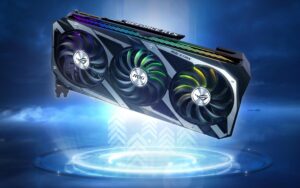
Graphics Card For Gaming PC
The graphics cards can take a large chunk of your budget.
It’s important not to spend too much or cut corners on this component.
You should purchase a GPU at $150 to $170 if you have a budget of $500 or less.
It could vary depending on how much you want to spend. However, most people should not spend more than 45% of their budget on a video card. It is especially true if you are concerned about price/performance.
The Power Supply For Gaming PC
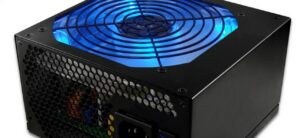
We are against the temptation to buy any random 450W power supply.
If you don’t intend to upgrade, a 450W power supply is sufficient.
However, if you plan to spend a lot on other components, it is essential to ensure That a reliable power supply protects them.
Look for 80+ power efficiency branding. 80+ bronze is a reliable and good choice for budget builds.
Upgrades are possible if you get a PSU with a higher wattage than you currently need.
The Case For Gaming PC
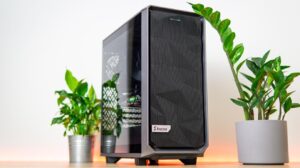
You can make some improvements to the chassis of your PC.
You don’t have to buy a fancy case if you build a budget or entry-level gaming computer. In reality, it is only good airflow that matters and sturdy quality that matters. __S.93__
For $55, the Fractal Design Focus G offers a great option.
If you care about aesthetics, you might want to spend a little more on the case.
We don’t recommend sacrificing quality to make your building look great
It is a subjective opinion.
What other information do I need?
You might still be a beginner to all this and wondering how to build your Gaming PC.
While the components mentioned above are essential, there are some other essential things you should keep in mind.
Most cases come with at least one fan, but you may want to add more later.
Important: This guide will help you choose a suitable cooler for your Processor.
A good cooler is essential to maintain the Processor’s temperature.
Both of these factors can have a significant impact on your overall budget.
Remember to include shipping and taxes.
It is possible to buy parts used, mainly if you can find a faster graphic card.
Old GPUs are available at a steep price. However, if you are willing to take the chance of purchasing used hardware, this is an option.
But, you shouldn’t buy used storage or power supply because you don’t know how long they’ll last.
You now know all the pitfalls and caveats involved in building a gaming computer. Let’s take a look at some build guides that are specific to individual budgets.
BEST GAMING PC BUILD UNDER 300
(Entry Level Build)
Let’s suppose you have a very tight budget of $300 to $350.
It might seem quite restrictive at first glance. However, you can build a cable rig to handle all Esports games. You’ll play most of these games at 1080p, some at 720p, and others at 720p.
We did much research and concluded that the $300 build was the best value for money for an entry-level build.
Note: This build does not include a separate graphics card. It is due to the integrated GPU of the AMD Ryzen 3 2200G.
Gaming Computers under $300
CPU
- AMD Ryzen3 2200G 3.5Ghz Quad-Core Processor.
- Built-in Graphics processing unit.
MOTHERBOARD
- MSI-B450M Pro M2 Manufactured under a trusted brand.
- It contains VGA, DVI, and HDMI ports.
RAM
- XPGZ1 DDR4 16GB 3000Mhz RAM DDR4
- 2x 8GB Sticks.
STORAGE
- SanDisk SSD PLUS, 240GB Fast loading time and booting speed over HDD.
- It will significantly improve your gaming experience.
CASE
- Aerocool Ceylon The best value for a money gaming case.
- Wide window with RGB Elements.
POWER SUPPLY
- EVGA 450W bronze 80+ It comes with a three-year warranty.
- EVGA has a reputation for producing the highest quality PSUs.
This rig is capable of handling most Esports games at 60fps. However, it’s only able to take 720p most of them.
It should suffice if you are only interested in playing games such as CS: GO or Rocket League, or League of Legends.
You can always add a graphic card later.
We are aware that this is not the fastest PC on the planet.
You’ll need to use used parts or increase your budget to make the best gaming PC for you in 2021.
You can get an older AMD FX8320 or a 4th generation i7 if you are looking for something used.
Combine that with a used GTX970 or a brand new RX570, and you’re ready to go.
Unfortunately, we are unable to give an exact estimate of the prices for these parts.
You could still put together a system using these configurations for around $350 to $400. So it’s not bad at all.
BEST GAMING PC BUILD UNDER $600
(Mid Range Build)
We’re here to help you build a PC for as low as $500 to $600.
With Nvidia’s 1650 and 1660 cards, including their “Super” or “Ti” versions, budget gaming has never been more accessible.
This $600 build is a great example.
Gaming Computers Under $600
CPU
- Intel 9100F up to 4.2Ghz with no built-in GPU
- 4 Cores & 4 Threads
MOTHERBOARD
- Asus PrimeH310M-E The perfect mobo for the i3 Processor.
- It has an integrated M.2 SSD.
RAM
- XPGZ1 DDR4 16GB 3000Mhz RAM DDR4
- 2x 8GB Sticks.
GRAPHICS CREDIT
- EVGA GeForce GTX 1650Super 4GB Graphics RAM.
- A maximum speed of 1755 MHz.
STORAGE
- Crucial 960GB SSD This 1TB SSD will enhance your gaming experience.
- SSD is well-known for its fast boot times.
CASE
- NZXT HTML510 The best-looking gaming case!
- Cable management, in this case, is simple.
POWER SUPPLY
- Corsair CX 550W 80+ Bronze Efficiency.
- Semi-Modular power supply.
It uses Intel’s Core i3-9100F, which is the most powerful Core i3 ever seen for gaming.
Combine that with a GTX 1650 Super, and you have a 1080p gaming champ.
A Crucial 960 GB SSD replaced the traditional hard drive.
You can bring the price down to 500 dollars if you don’t need an SSD.
Prices change frequently, and new products are released so that you may build a better rig.
If you’re looking to play most of the games in 1080p, this $600 budget zone is the best option.
BEST GAMING PC BUILD UNDER 1000
(Higher End Build)
Let’s suppose you want to play all the latest Triple-A big-budget Triple-A games at high settings starting at 1080p and 1440p.
How much should you spend on a computer that can do all that?
It is not easy to give a precise figure, but you can expect around $1000.
It all depends on the use case.
Below is the list. There are many choices, so it comes down to personal preference.
The gaming rig’s base is the AMD Ryzen 5 3600 Hexa-core processor.
Gaming Computers Under $1000
CPU
- AMD Ryzen5 3600 6 Cores, 12 Threads
- It also comes with a Wraith Stealth Cooler. It also comes with a “Wraith Stealth Cooler.”
MOTHERBOARD
- ASRock Phantom Gaming Integrated M.2 WiFi.
- 8 Sata3 Inputs, 4 RAM Slots.
RAM
- XPGZ1 DDR4 16GB 3200Mhz DR4 Memory.
- 2x 8GB Sticks.
GRAPHICS CREDIT
- XFX Radeon 5700XT 8GB Graphics RAM.
- Up To 1980MHz.
STORAGE
- Crucial BX500 HDD 960GB Fast loading time and booting speed
- 1TB capacity will be sufficient for this budget.
CASE
- NZXT W510 This case should be in white!
- Wide window to show off your hardware.
POWER SUPPLY
- Corsair RMSx 550W 80+Gold 80+Gold Efficiency.
- Fully Modular power supply.
You can pair it with an RX5700 XT. Add an SSD, a well-designed case, and the rest of the components to bring it down to $1000.
This graphic card is great for playing games at 1440p with a faster refresh rate, like 144Hz. However, if you have the budget, RTX 2080 might be a better option.
In this situation, the RTX2080 is a strong performer.
It is capable of handling every game at maximum settings in 1440p or even 4k. If you are a competitive player, you will be grateful for the extra frames.
It is our take!
As you can see, there’s no one PC that you can claim to be the best gaming computer. Instead, people can use many things and get the benefit.
A high-end computer that can run 4K gaming, productivity software, and other stuff will not be helpful to someone who wants to play casual games now and again.
We hope you found this guide helpful.
1 thought on “How Much Does It Cost To Build A Gaming PC?”